KR Runebooks
Runebooks
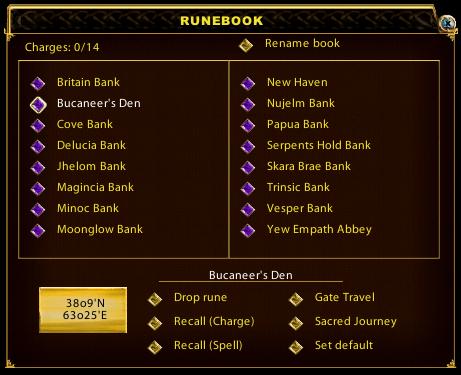
Runebooks are very simple to use in KR.
Double left clicking a runebook in your backpack or single left clicking a runebook in a hotbar will open the above gump.
Clicking on the desired location will highlight it (above Buccaneer's Den is selected), place it's name and coordinates in the lower part of the gump. You may then select the form of travel, i.e., Recall (charge) if the book has recall scrolls loaded to charge it, Recall (spell) using the mage spell, Gate Travel using the mage spell or Sacred Journey using the Chivalry spell.
To place a marked rune in a book the book must be closed. (close by clicking the 'X' button or right clicking in the Runebook title bar at the top).
To remove a rune from the book select the gem for 'drop rune'
To Set the title of the book click on the gem for 'rename book' and type the name of the book in the text box provided.
To Set a default location (ie a location that when targeting the book with a spell will automatically take you to that location) highlight the location you want and click the gem for 'set default'
Hints
- KR, at present, does not allow you to use runebooks with a default set in it's macro system (ie to select recall (gate/sacred journey)/ target book and automatically recall to the default location by assigning it a key or putting it in a hotbar). The best you can do is to set a macro or drag the spell icon (mage or chiv) from a spellbook to a hotbar and set either to target 'cursor' and assigning a hotkey if desired.
- Runebooks may be dragged to a hotbar for easy access and do not need to be kept in the main backpack. If storing them in a separate bag in your main backpack, you must 'open' that bag on log in to 'refresh' the books in the hotbar or they will not work when clicked.
- You may now set the 'default locations' in your runebooks and load them into a hotbar. Casting a recall spell and targeting the book with your cursor in the hotbar will now recall you to the default location instead of opening the book. A much needed change! To open the book just left click on it once as before.